3,000 m
The architecture
Once an AI reviewer is commenting on every merge request, the static analysis stage starts to look like a redundant line item. It isn’t. A good AI reviewer makes your linter more important, because the linter is what frees the reviewer to look at the things that matter.
Only deterministic checks get a veto
Only your static analyser gets to block a merge on its own. Your large language model (LLM) reviewer runs afterwards with the analyser’s results in hand, and its findings are advice, with one exception: when it raises a security concern, a human decides. Collapse the two into one AI step and you get a review that is slower, more expensive and harder to trust than the one it replaced.
The analogy I keep coming back to is a smoke alarm and a building inspector. The smoke alarm is cheap and not very bright. It can’t tell burnt toast from a kitchen fire, but it never forgets to check. The inspector can tell you the deck won’t survive the next storm, but bills by the hour and occasionally has an off day. Nobody cancels their smoke alarms because they booked an inspection.
A gate has to give the same answer twice. When a build fails, the developer needs to see which rule fired, on which line, and reproduce it on their own machine. A linter does exactly that, whether it’s PMD for Apex, ESLint for Lightning Web Components or Salesforce Code Analyzer running both. An LLM won’t, even with the temperature turned down, and a model upgrade can change what it flags without anyone touching a config file. Your ruleset has a Git history. The model’s judgement lives on someone else’s server.
Then there’s attention. Every extra instruction in a review prompt competes with the others. Ask the model to check class suffixes and hardcoded IDs alongside the business logic, and it will be admirably thorough about class suffixes.
Linting isn’t only for code, either. In a Salesforce org a lot of the system lives in configuration: objects, fields, flows, permission sets. The same deterministic checks apply there, and the humble ones earn their keep: a field with no description or help text, a flow nobody bothered to explain. It looks like housekeeping until someone has to work out what Status_2__c is for. These days that someone is often an AI coding agent, reading the metadata for context.
The review process I work within covers six areas: conformance to our design patterns, framework naming, domain naming, static rule violations, behaviour (intent, bugs, regressions and performance) and, arguably the most important, security. Split by owner, it looks like this.
| Check | Examples | Scope | Owner | Why |
|---|---|---|---|---|
| Pattern conformance | Salesforce Object Query Language (SOQL) kept in selector classes, modules called from trigger handlers | Diff lines + context | Both | Structure is rule-checkable, “right pattern for this problem” is not |
| Framework naming conventions | Class suffixes such as Selector, Module, Action and Service | Diff lines | Linter | Pure pattern matching, no judgement required |
| Domain naming conventions | Names that match the business domain or capability the code belongs to | Diff lines | LLM | A rule can match a pattern, but it can’t tell which domain a class belongs to |
| Rule violations | Missing descriptions, queries or data manipulation language (DML) inside loops | Diff lines | Linter | Deterministic, cheap and repeatable |
| Behaviour | Recursive operations that burn through limits, repurposing a field shared across domains | Diff lines + context | LLM | Needs the story, the surrounding code and judgement |
| Security | SOQL injection and hardcoded credentials (rules), a new @AuraEnabled method exposing records to guest users (the model) | Any touched file | Both, then a human | Rules catch the known patterns every time, the model reasons about exposure no rule can describe, and a human owns the risk |
Security is the row where two layers still aren’t enough. A linter catches the known shapes, like a query that ignores the running user’s permissions or a hardcoded credential, and catches them every time. What it can’t see is a perfectly compliant method that hands every customer’s address to a guest user because the story said to show the address.
The LLM can reason about that kind of exposure, but it’s probabilistic, and security is exactly where “usually spots it” isn’t good enough. So security findings from the model aren’t advice you scroll past. They go to a human, who either fixes the issue or signs off on why it’s fine. Anything touching access, sharing or credentials gets that human review regardless of what the tools said.
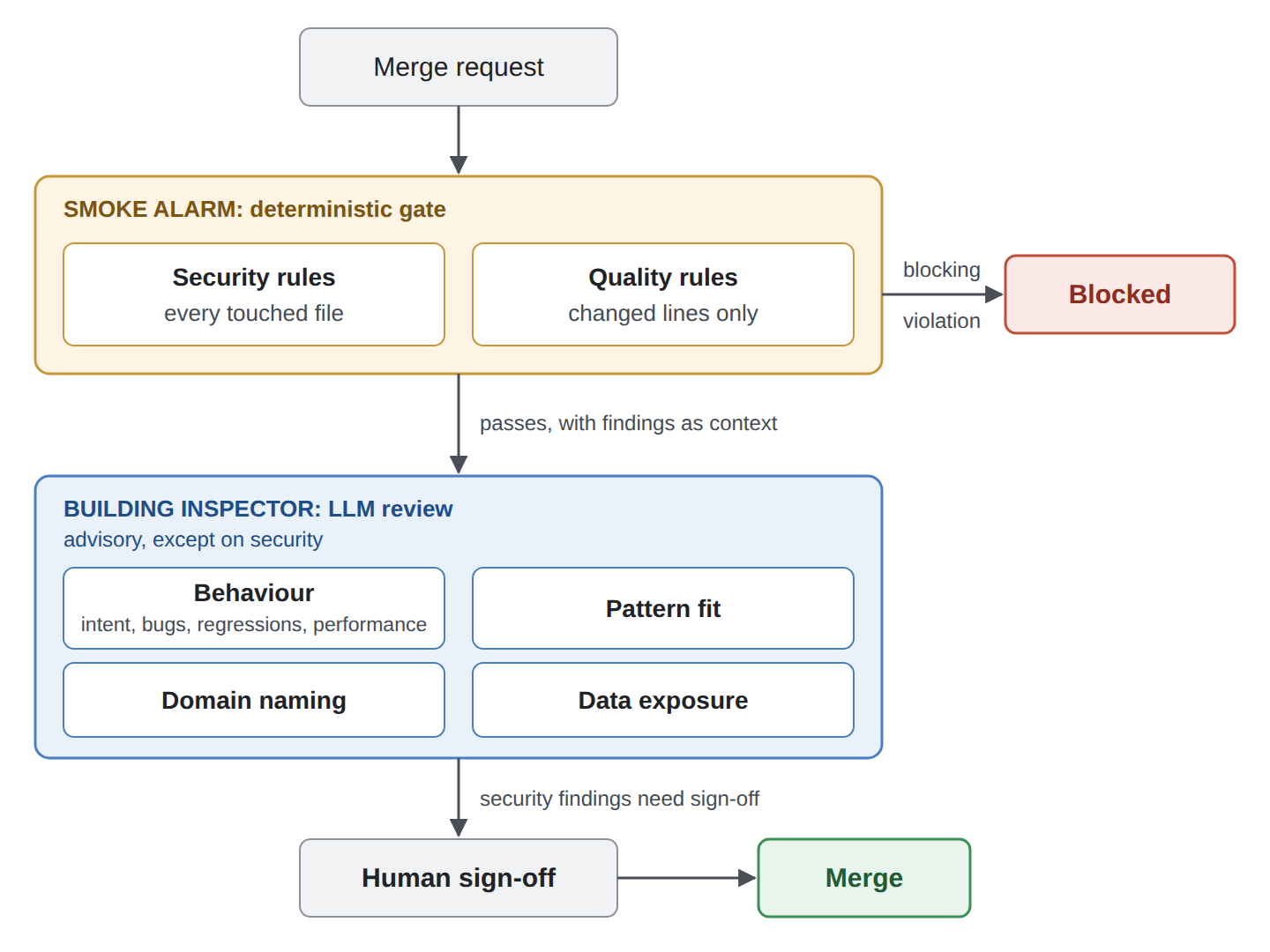
Nothing merges without a human, least of all anything the model flags as a security concern.
This split has costs. It means two systems to maintain, and a ruleset without an owner rots quietly. It also matters less for small teams: if three developers share a modest codebase, one careful human reading the lint output is plenty. The split pays off when volume makes reviewer attention the scarce resource, which in a large org is roughly always.
300 m
The delivery team
Lint the diff for quality, the whole file for security
Scope linting by risk. Gate quality rules on the lines a merge request changes, run security rules across every file it touches, and leave the rest of the legacy alone until someone opens it. A full-repo gate sounds rigorous and in practice gets switched off. This stop is mostly about the smoke alarm (the linter), with the building inspector (the LLM reviewer) turning up near the end.
Run a sensible lint ruleset across a monorepo of 10,000-plus files and 100-plus developers and you get a violation count nobody wants to read. Much of it is older than some of the team. No product owner will fund a sprint to fix lint. The report becomes wallpaper, the job gets marked “allow failure”, and eventually someone removes it during a pipeline tidy-up.
A smoke alarm that goes off every day doesn’t get anyone out of the building. It gets the battery taken out.
Diff-scoped linting turns the gate into a ratchet. New code meets the standard from its first commit, and old code improves as people touch it. The count only moves one way.
There are two ways to scope a diff. Scoping to changed files lints every file the branch touches, so a one-line fix can drag in dozens of old violations. Scoping to changed lines only reports violations on lines the branch added or modified, which is fairer. The catch is whole-method rules like length or cyclomatic complexity: a new line can tip the method over, but the violation is reported at the declaration, which nobody changed.
So I split them by risk. Quality rules only report on lines the change added or modified, so nobody gets blocked over someone else’s old formatting. Security rules run across every touched file in full, and any violation blocks, including one that’s been sitting there for years. That feels unfair the first time it happens to you, and it’s also the point: touch the file and you own its exposure.
The reason is reachability. Add @AuraEnabled to a method, and a query a few lines below it, untouched for years, is suddenly reachable from the browser by anyone with access to that class. The diff shows one new annotation, while the risk sits in the lines around it.
None of this depends on which linter you run. PMD, ESLint and Salesforce Code Analyzer all accept a list of files, so point yours at the changed ones instead of the whole workspace, and do the same for your flow and metadata checks.
Two things sit outside this scoping. Dependency and secret scanning run across the whole project as separate status checks, because a vulnerable library is live whether or not this sprint touched it. And greenfield projects can skip the scoping altogether: with no legacy to protect, lint the lot.
Scope decides where a rule looks. Severity decides whether it blocks, and getting severity wrong does more damage than a missing rule. Every rule in the ruleset should earn its place, and if nobody can say what it prevents, it’s noise with a config file.
I learned this the slow way. When I first became a tech lead, I weighted cosmetic violations the same as functional ones, and every merge request had to be spotless before it went in. The result was a frustrated team and features waiting on formatting debates. The code was a canvas and I was curating the gallery.
Over time I started picking my battles. Consistency still matters, because it makes code faster to read and review across a big team. But a cosmetic finding changes nothing at runtime, so fixing it gets weighed against timelines and budgets like any other cost. A useful test: if this violation shipped, would anything behave differently?
| Tier | Examples | What happens |
|---|---|---|
| Blocking | Security rules, limit-consuming operations inside loops, hardcoded IDs, tests without asserts, framework class naming, missing descriptions | Fails the merge request |
| Advisory | Complexity thresholds, long parameter lists, debug statements, queries without a filter | Comment on the merge request, developer’s call |
| Cosmetic | Declaration order, variable and parameter naming, one declaration per line | A formatter or auto-repair fixes it, never blocks |
The ruleset I work with actually has two levels, required and recommended, and both the advisory and cosmetic tiers sit in recommended. It’s still worth knowing which is which, because only the cosmetic ones should go to a fixer without a second look.
The line isn’t only functional versus cosmetic, either. Some rules look cosmetic but are load-bearing, because other rules depend on them. Framework naming, like the Selector suffix, sits in the blocking tier for exactly that reason. A rule such as “no SOQL outside selector classes” only works if every selector is reliably named. Let that naming drift and every rule built on top of it drifts too.
Better still, take layout out of review entirely. When an agent writes a good share of the code, blocking a developer on brace placement is arguing with a tool. An opinionated formatter like Prettier (natively for Lightning Web Components, via a community plugin for Apex) rewrites whitespace, brace placement and line wrapping on save or in a pre-commit hook. The argument about where the brace goes gets settled once, in a config file, and never again in a merge request. It won’t rename a variable, so a thin layer of cosmetic lint rules stays, but most of that tier disappears.
The analyser’s output then goes into the LLM review as context, with a plain instruction: these are already flagged, don’t repeat them, look for what a rule can’t see. For changes touching sharing, access or credentials, give it the surrounding code as well as the diff. The model is also handy for triaging likely false positives and drafting suppression comments, but it doesn’t get to clear the gate.
Auto-repair is the obvious next step: if the model can spot the problem, let it fix it. The speed case is real. In GitHub’s 2024 public beta, developers committed Copilot Autofix fixes for pull request alerts in a median of 28 minutes, against 1.5 hours by hand (GitHub). That’s vendor data about a vendor product, but the direction is hard to argue with.
The case for supervision is just as real. GitHub’s own documentation warns that generated fixes can change what the program does, only partly fix the problem, or introduce a new vulnerability (GitHub Docs). A 2026 study of 319 LLM-generated patches for 64 Java vulnerabilities found only 24.8% were fully correct, while 51.4% failed on both security and functionality (Al-Maamari, 2026). A pilot for another 2026 study, with eight participants patching Python code, found that people out of their depth on security trusted the assistant’s patch with little verification (Helpful or Harmful?, 2026).
So the model can repair, inside a fence. Where a deterministic fixer exists, like ESLint’s --fix or a code formatter, use that first: same input, same fix. Cosmetic and advisory findings on changed lines are fair game for the model, as a separate commit. That commit goes back through the same lint gate and test run, then gets human review like any other change. Missing descriptions are the exception worth making: they block, but the model can draft one from how the field is used, and a human only has to confirm it’s true.
Security findings get a suggested fix in a comment, never an applied one. And the model never adds a suppression, because silencing a rule is a decision, not a repair, and a human approves every one. The inspector can sketch the fix. Someone with their name on the building signs it off.
The payoff comes when the two layers start to compound. When the LLM reviewer flags the same thing across several merge requests, stop paying tokens to find it and write it as a rule. In an org that uses the selector pattern, the classic candidate is SOQL living outside a selector class. A custom PMD rule can catch that by walking the syntax tree.
A rule like that has limits worth knowing. It checks where a query lives, not whether it’s the right query, so a selector that quietly drops half the records the story needed passes cleanly. That’s still the inspector’s job, and the inspector now has more attention for it because the alarm handled the rest.
Before your next sprint planning, export the last month of LLM review comments and find the one that turns up most. Write it as a lint rule and add it to the gate. If it can’t be expressed as a rule, that’s useful too: you’ve found where the line between smoke alarm and inspector sits in your codebase.
